> ## Documentation Index
> Fetch the complete documentation index at: https://docs.cloudcapital.co/llms.txt
> Use this file to discover all available pages before exploring further.
# Integrate Claude.ai Enterprise
> Connect Claude.ai Enterprise seat and usage spend to Cloud Capital with an Analytics API key. Claude.ai support is currently in Beta.
**Claude.ai Enterprise support is in Beta.** To enroll, request access from your Cloud Capital Customer Success Manager. Once your account is enabled, **Claude.ai Enterprise** appears as an option on the New Integration page. If you don't see it yet, reach out to your Customer Success Manager.
Building on the **Claude API** instead (developer bill at console.anthropic.com, `sk-ant-…` keys)? See [Integrate Claude API](/get-started/claude-api-data-integration). The two keys are not interchangeable.
Cloud Capital reads your **Claude.ai Enterprise** usage and seat spend from the Claude.ai Analytics API. You paste an **Analytics API key** and choose a **default seat rate**; the key is encrypted and stored on the integration. Seat fees are estimated from observed users × that rate. This path is **forecast-only**.
Setup takes about 5 minutes once you have an Analytics API key.
***
### What Cloud Capital accesses
| What you're granting | How | Scope |
| -------------------- | --------------------------------------------------- | ---------------------------------------------------------------------------- |
| Analytics API key | Pasted into the integration form, encrypted at rest | Read access to Claude.ai Enterprise Analytics for your organization |
| Default seat rate | Configured in Cloud Capital | Used to synthesize seat fees when the API does not supply dollar seat prices |
Cloud Capital uses the key only to **read** analytics cost data. It does not create, modify, or delete resources in Claude.ai, and this integration does not enable commitment purchasing or billing transfer.
### What's available with Claude.ai today
| Available | Not yet available |
| ------------------------------------------------------------------------------------------- | ------------------------------------------- |
| Cost forecasting, cost insights, and cost allocation for Enterprise usage + estimated seats | Commitment purchasing through Cloud Capital |
| Nightly ingest of daily cost data | Billing through Cloud Capital |
***
### Before you begin
* **Enterprise only** — Max/Pro and Team plans are **not** covered. You need Claude.ai **Enterprise**.
* **Choose the right product** — Use Claude.ai if your team signs in at [claude.ai](https://claude.ai) for chat, Claude Code, or Cowork. If you bill API usage at console.anthropic.com, connect [Claude API](/get-started/claude-api-data-integration) instead.
* **Admin access** — You need permission to create an **Analytics API key** under Claude.ai organization settings → API. Keys for this path start with `sk-ant-api01-`.
* **Not covered here** — Amazon Bedrock Anthropic usage stays on your [AWS integration](/get-started/aws-data-integration).
* **Wrong key types fail** — Console Admin keys (`sk-ant-admin…`) and inference keys (`sk-ant-api03-…`) are rejected on this form.
### Setup
In Cloud Capital, go to the **Integrations** page — from Cost Allocation, use **Manage Cloud Providers**. Click **Create New Integration** and choose **Claude.ai Enterprise**.
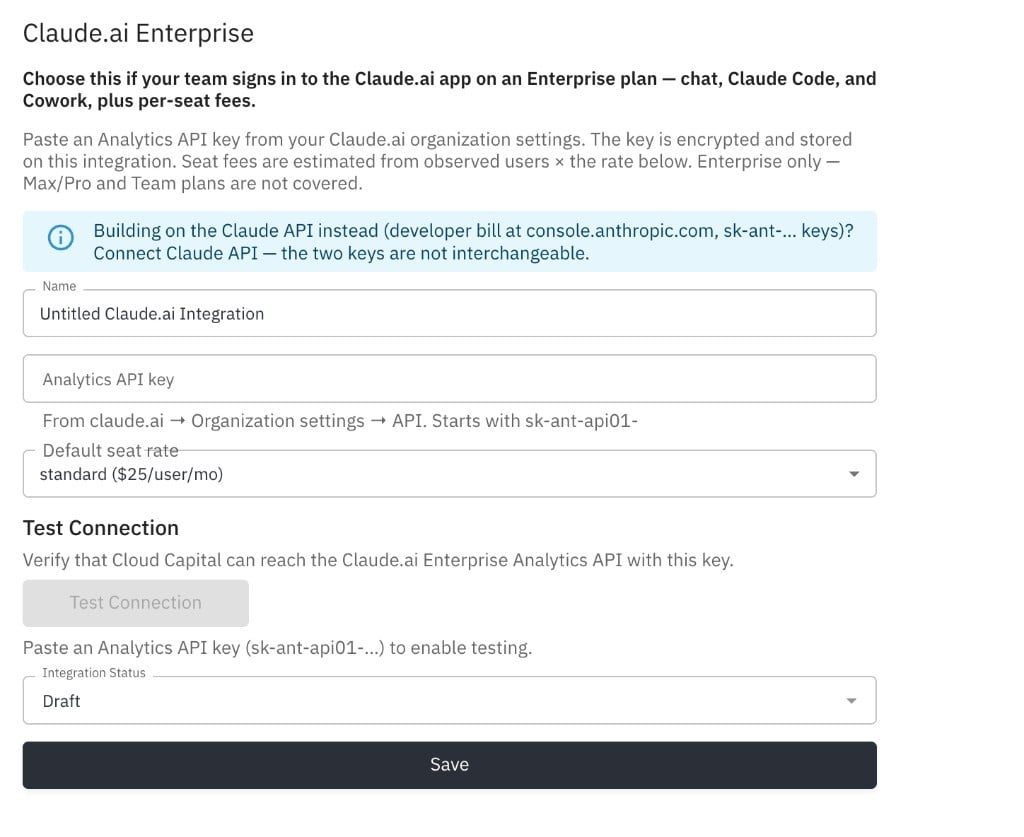
The new integration opens on the Integration Settings page. Give it a descriptive name.
 In Claude.ai, open **Organization settings → API** and create an **Analytics API key**.
The key should start with `sk-ant-api01-`. Copy it once at creation time.
Do not paste a Console Admin key or a Console inference key. Those belong to [Claude API](/get-started/claude-api-data-integration) and will fail here.
On the Integration Settings page:
1. Paste the Analytics API key into the **Analytics API key** field.
2. Choose a **Default seat rate** that matches your Anthropic seat type:
* **standard**
* **premium**
* **free**
3. Click **Test Connection**. Cloud Capital verifies it can reach the Claude.ai Enterprise Analytics API.
4. After a successful test, set status to **Enabled** and click **Save**.
Seat fees are synthesized from roster × your configured monthly rate; they are not imported from an invoice. Pick the rate that matches how Anthropic bills your seats. You can change it later and re-save.
***
### What to expect after setup
* **Data timing** — Cost data is ingested on a scheduled nightly cycle. Expect dashboards within about 24 hours of a successful connection.
* **Seat estimates** — Seat dollar amounts come from observed users × your default seat rate, not from a separate invoice PDF import.
* **Forecast only** — Commitment purchasing and billing transfer are not part of this integration.
### Troubleshooting
| Symptom | What to check |
| --------------------------------------- | ------------------------------------------------------------------------------------------------------------------------------------------ |
| Claude.ai card missing or Coming Soon | Your org is not enrolled yet. Ask your Customer Success Manager to enable `claudeAi`. |
| Connection test fails / 401 | Confirm you pasted an Analytics key (`sk-ant-api01-…`), not a Console Admin or inference key. |
| Form blocks save with a key-type notice | You likely pasted a Claude API Admin or inference key. Use Analytics, or switch to [Claude API](/get-started/claude-api-data-integration). |
| Max/Pro or Team plan | Not supported. Enterprise is required. |
| Test passes but dashboards are empty | Allow up to 24 hours for nightly ingest. Confirm Enterprise Analytics shows recent activity. |
***
For a full overview of how Cloud Capital handles data access, encryption, audit logging, and compliance, see the Security page.
In Claude.ai, open **Organization settings → API** and create an **Analytics API key**.
The key should start with `sk-ant-api01-`. Copy it once at creation time.
Do not paste a Console Admin key or a Console inference key. Those belong to [Claude API](/get-started/claude-api-data-integration) and will fail here.
On the Integration Settings page:
1. Paste the Analytics API key into the **Analytics API key** field.
2. Choose a **Default seat rate** that matches your Anthropic seat type:
* **standard**
* **premium**
* **free**
3. Click **Test Connection**. Cloud Capital verifies it can reach the Claude.ai Enterprise Analytics API.
4. After a successful test, set status to **Enabled** and click **Save**.
Seat fees are synthesized from roster × your configured monthly rate; they are not imported from an invoice. Pick the rate that matches how Anthropic bills your seats. You can change it later and re-save.
***
### What to expect after setup
* **Data timing** — Cost data is ingested on a scheduled nightly cycle. Expect dashboards within about 24 hours of a successful connection.
* **Seat estimates** — Seat dollar amounts come from observed users × your default seat rate, not from a separate invoice PDF import.
* **Forecast only** — Commitment purchasing and billing transfer are not part of this integration.
### Troubleshooting
| Symptom | What to check |
| --------------------------------------- | ------------------------------------------------------------------------------------------------------------------------------------------ |
| Claude.ai card missing or Coming Soon | Your org is not enrolled yet. Ask your Customer Success Manager to enable `claudeAi`. |
| Connection test fails / 401 | Confirm you pasted an Analytics key (`sk-ant-api01-…`), not a Console Admin or inference key. |
| Form blocks save with a key-type notice | You likely pasted a Claude API Admin or inference key. Use Analytics, or switch to [Claude API](/get-started/claude-api-data-integration). |
| Max/Pro or Team plan | Not supported. Enterprise is required. |
| Test passes but dashboards are empty | Allow up to 24 hours for nightly ingest. Confirm Enterprise Analytics shows recent activity. |
***
For a full overview of how Cloud Capital handles data access, encryption, audit logging, and compliance, see the Security page.