> ## Documentation Index
> Fetch the complete documentation index at: https://docs.cloudcapital.co/llms.txt
> Use this file to discover all available pages before exploring further.
# Savings Realisation
> How Cloud Capital measures and reports your realised AWS savings, including the Effective Savings Rate, savings breakdown by source, and commitment performance tracking.
Cloud Capital shows you exactly how much you're saving on AWS infrastructure — and where each dollar of savings comes from. This page explains how to read and use the Savings section, including how Cloud Capital measures realised savings and the Effective Savings Rate (ESR).
***
## The Savings Page
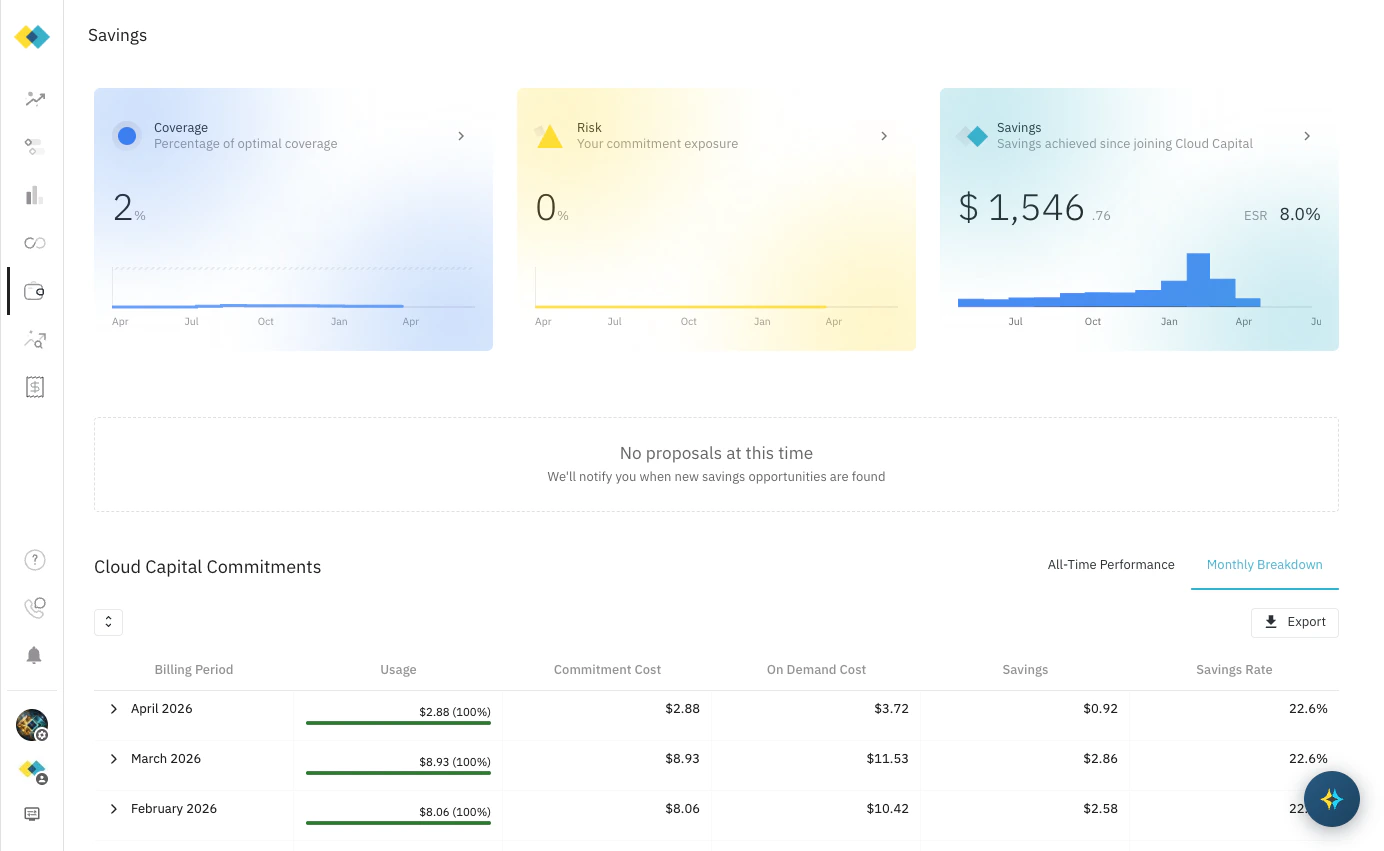
Navigate to **Savings** in the left sidebar to see your full savings summary. The page is organised into three areas:
* **Summary cards** — a top-level view of your coverage, risk, and total savings
* **Proposals** — new savings opportunities identified by Cloud Capital
* **Cloud Capital Commitments** — a detailed table of all active and historical commitments with utilisation, cost, and savings data
 ***
## Summary Cards
Three cards at the top of the page provide a real-time snapshot of your savings position:
| Card | What it shows |
| ------------ | ----------------------------------------------------------------------------------------------------------------------------------------------------------- |
| **Coverage** | The percentage of your eligible spend covered by commitments — how much of your on-demand equivalent spend has been converted to discounted committed usage |
| **Risk** | Your commitment exposure: the percentage of committed spend not yet matched to actual resource usage. 0% means all commitments are fully utilised |
| **Savings** | Total dollar savings realised since joining Cloud Capital, and your current Effective Savings Rate (ESR) |
***
## Savings Analysis Flyover
Click the arrow on the **Savings** card to open a detailed breakdown of where your savings come from. The flyover has two tabs.
### Cloud Capital Tab
Shows the savings directly attributable to Cloud Capital's actions — commitments sourced and managed on your behalf, plus the platform discount.
***
## Summary Cards
Three cards at the top of the page provide a real-time snapshot of your savings position:
| Card | What it shows |
| ------------ | ----------------------------------------------------------------------------------------------------------------------------------------------------------- |
| **Coverage** | The percentage of your eligible spend covered by commitments — how much of your on-demand equivalent spend has been converted to discounted committed usage |
| **Risk** | Your commitment exposure: the percentage of committed spend not yet matched to actual resource usage. 0% means all commitments are fully utilised |
| **Savings** | Total dollar savings realised since joining Cloud Capital, and your current Effective Savings Rate (ESR) |
***
## Savings Analysis Flyover
Click the arrow on the **Savings** card to open a detailed breakdown of where your savings come from. The flyover has two tabs.
### Cloud Capital Tab
Shows the savings directly attributable to Cloud Capital's actions — commitments sourced and managed on your behalf, plus the platform discount.
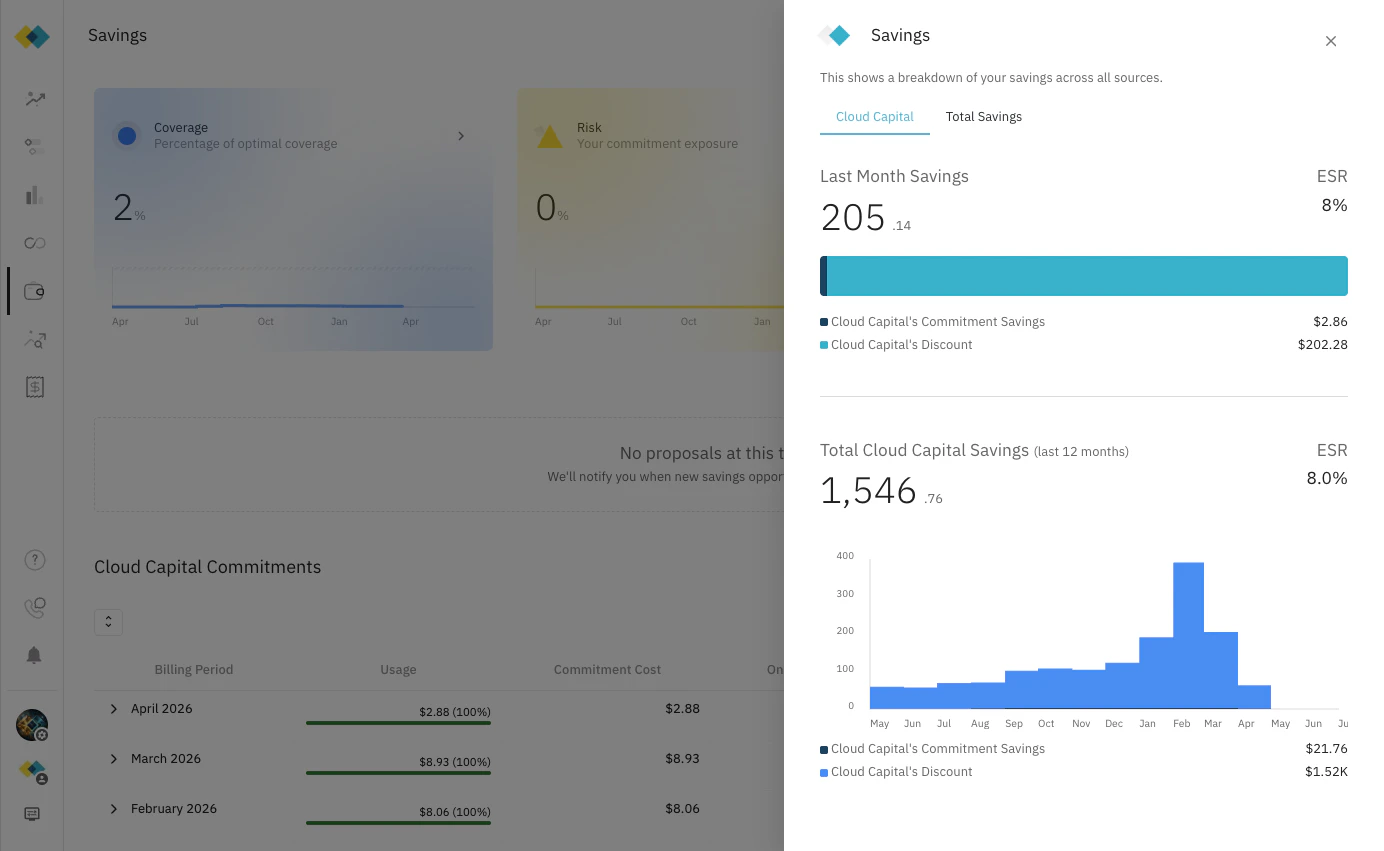 * **Last Month Savings** — what Cloud Capital saved you in the most recent billing period, with ESR
* **Cloud Capital's Commitment Savings** — savings from Reserved Instances and Savings Plans that Cloud Capital sourced
* **Cloud Capital's Discount** — the platform discount Cloud Capital applies to your infrastructure costs
* **Total Cloud Capital Savings (last 12 months)** — cumulative savings over the trailing 12-month window, charted by month
### Total Savings Tab
Shows your complete savings picture across all sources, including commitments and discounts that pre-date your Cloud Capital engagement.
* **Last Month Savings** — what Cloud Capital saved you in the most recent billing period, with ESR
* **Cloud Capital's Commitment Savings** — savings from Reserved Instances and Savings Plans that Cloud Capital sourced
* **Cloud Capital's Discount** — the platform discount Cloud Capital applies to your infrastructure costs
* **Total Cloud Capital Savings (last 12 months)** — cumulative savings over the trailing 12-month window, charted by month
### Total Savings Tab
Shows your complete savings picture across all sources, including commitments and discounts that pre-date your Cloud Capital engagement.
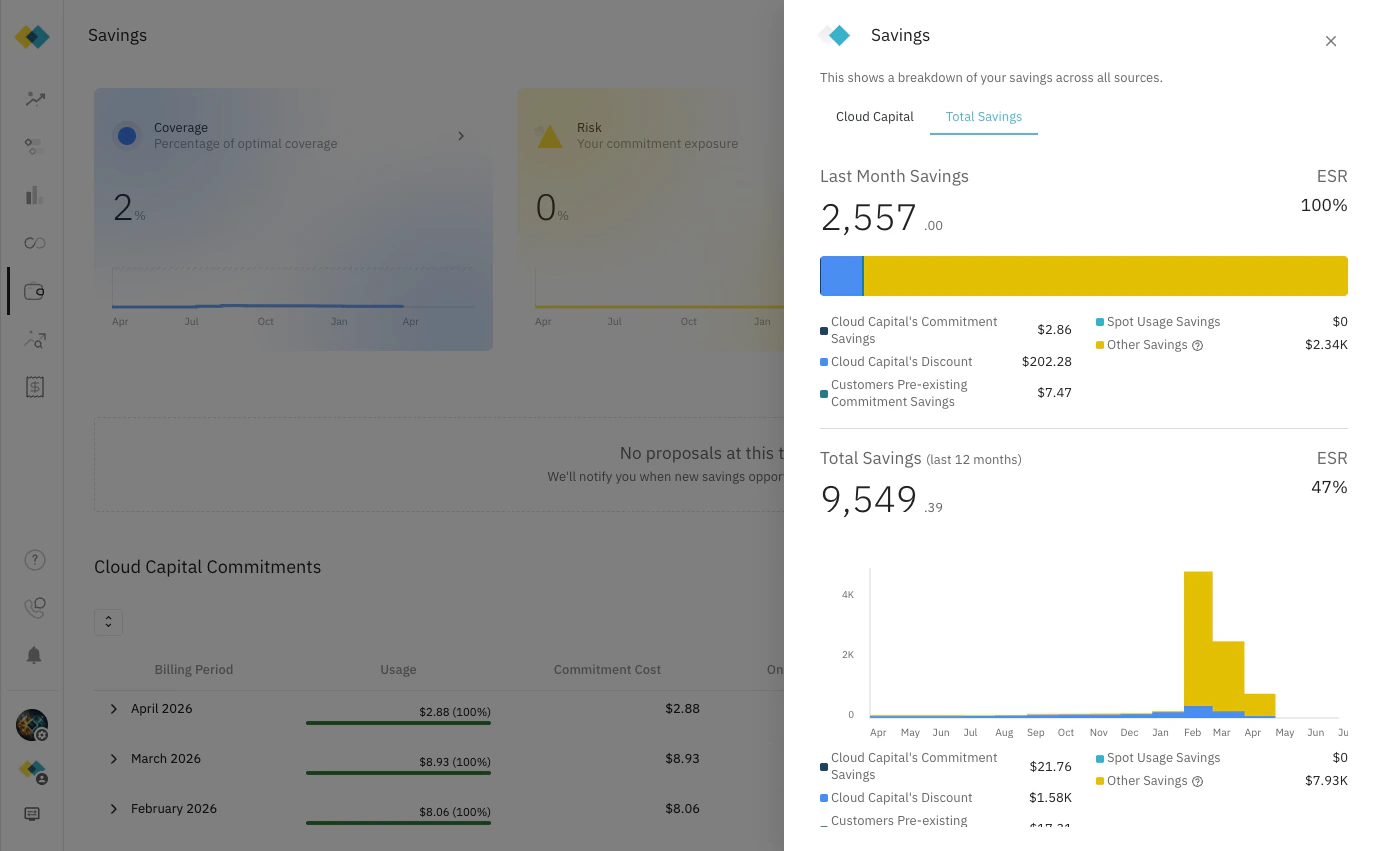 | Savings Category | Description |
| --------------------------------------------- | ----------------------------------------------------------------------- |
| **Cloud Capital's Commitment Savings** | Savings from commitments sourced and managed by Cloud Capital |
| **Cloud Capital's Discount** | Platform discount applied by Cloud Capital |
| **Customers Pre-existing Commitment Savings** | Savings from commitments you held before joining Cloud Capital |
| **Spot Usage Savings** | Savings from AWS Spot Instance usage |
| **Other Savings** | Enterprise discounts, product discounts, partner discounts, and similar |
***
## Effective Savings Rate (ESR)
The **[Effective Savings Rate](/glossary)** (ESR) is the primary metric Cloud Capital uses to measure the efficiency of your cloud spend optimisation.
> ESR = Total Savings ÷ Total On-Demand Cost
It answers the question: *"Out of what you would have paid at full on-demand rates, what percentage are you saving?"*
An ESR of 8% means that for every dollar of on-demand-equivalent spend, you pay \$0.92 and save \$0.08. A higher ESR indicates more effective commitment coverage and discounting.
The ESR shown on the **Savings** card and the **Cloud Capital** flyover tab reflects Cloud Capital's direct contribution. The **Total Savings** tab shows the ESR across all sources combined — including pre-existing commitments, Spot, and other discounts.
***
## Cloud Capital Commitments
The **Cloud Capital Commitments** table shows the detailed record of all commitments in your portfolio. Switch between two views using the tabs at the top right.
### Monthly Breakdown
A month-by-month view of commitment performance. Each row covers one billing period:
| Column | Description |
| ------------------- | ------------------------------------------------------------- |
| **Billing Period** | The calendar month |
| **Usage** | Total committed spend consumed that month, with utilisation % |
| **Commitment Cost** | The amortised cost of your commitments for the period |
| **On Demand Cost** | What the same usage would have cost at on-demand rates |
| **Savings** | On Demand Cost minus Commitment Cost |
| **Savings Rate** | Savings as a percentage of On Demand Cost |
### All-Time Performance
| Savings Category | Description |
| --------------------------------------------- | ----------------------------------------------------------------------- |
| **Cloud Capital's Commitment Savings** | Savings from commitments sourced and managed by Cloud Capital |
| **Cloud Capital's Discount** | Platform discount applied by Cloud Capital |
| **Customers Pre-existing Commitment Savings** | Savings from commitments you held before joining Cloud Capital |
| **Spot Usage Savings** | Savings from AWS Spot Instance usage |
| **Other Savings** | Enterprise discounts, product discounts, partner discounts, and similar |
***
## Effective Savings Rate (ESR)
The **[Effective Savings Rate](/glossary)** (ESR) is the primary metric Cloud Capital uses to measure the efficiency of your cloud spend optimisation.
> ESR = Total Savings ÷ Total On-Demand Cost
It answers the question: *"Out of what you would have paid at full on-demand rates, what percentage are you saving?"*
An ESR of 8% means that for every dollar of on-demand-equivalent spend, you pay \$0.92 and save \$0.08. A higher ESR indicates more effective commitment coverage and discounting.
The ESR shown on the **Savings** card and the **Cloud Capital** flyover tab reflects Cloud Capital's direct contribution. The **Total Savings** tab shows the ESR across all sources combined — including pre-existing commitments, Spot, and other discounts.
***
## Cloud Capital Commitments
The **Cloud Capital Commitments** table shows the detailed record of all commitments in your portfolio. Switch between two views using the tabs at the top right.
### Monthly Breakdown
A month-by-month view of commitment performance. Each row covers one billing period:
| Column | Description |
| ------------------- | ------------------------------------------------------------- |
| **Billing Period** | The calendar month |
| **Usage** | Total committed spend consumed that month, with utilisation % |
| **Commitment Cost** | The amortised cost of your commitments for the period |
| **On Demand Cost** | What the same usage would have cost at on-demand rates |
| **Savings** | On Demand Cost minus Commitment Cost |
| **Savings Rate** | Savings as a percentage of On Demand Cost |
### All-Time Performance
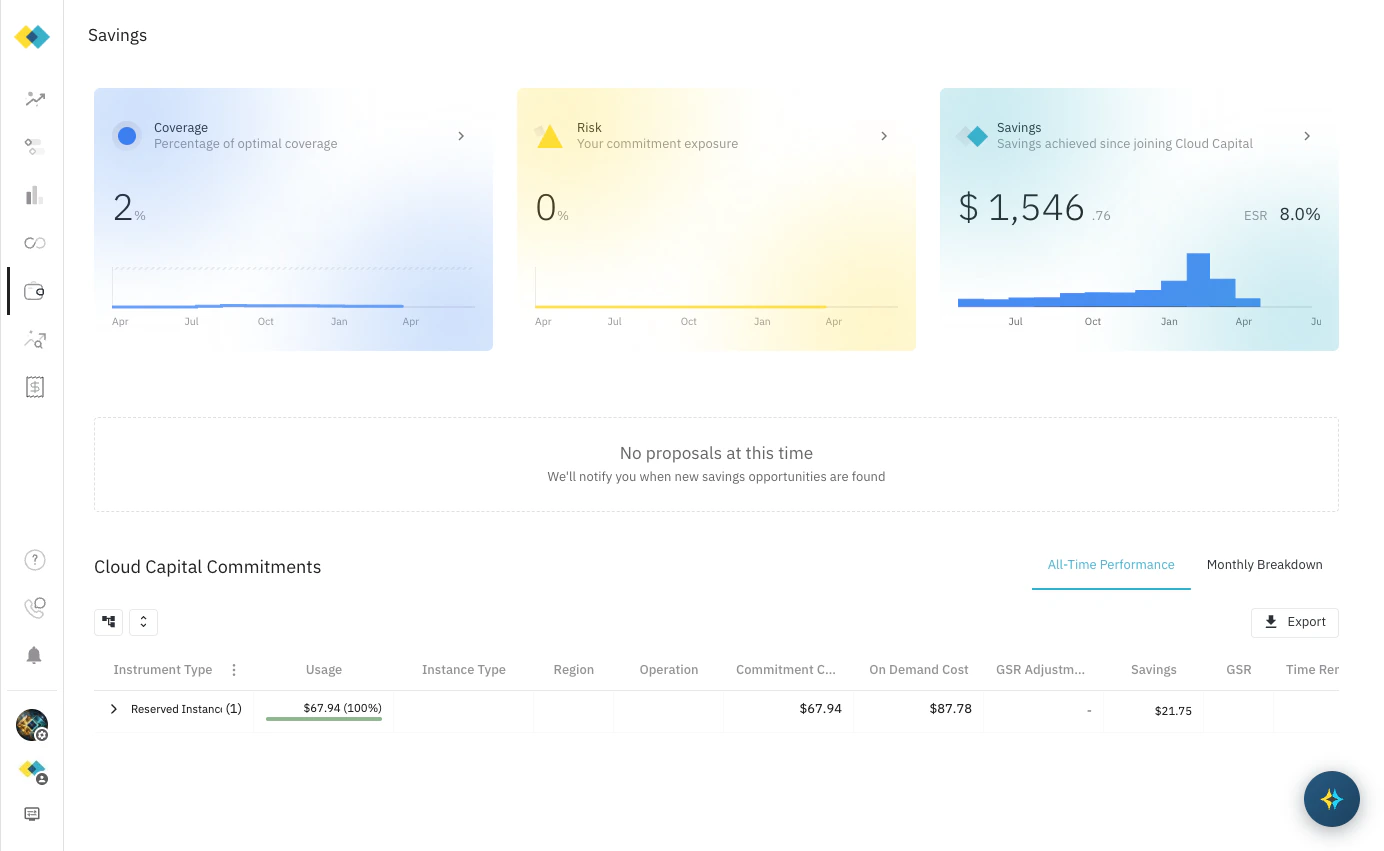 A per-instrument view aggregated across the full commitment term. Each row represents one commitment (for example, a Reserved Instance or Savings Plan):
| Column | Description |
| ------------------- | ------------------------------------------------------------------------------------------------- |
| **Instrument Type** | The commitment type — Reserved Instance or Savings Plan |
| **Usage** | Total units consumed vs available, with utilisation % |
| **Instance Type** | The specific instance or resource type committed to |
| **Region** | The AWS region the commitment applies to |
| **Operation** | The OS or usage operation covered by the commitment |
| **Commitment Cost** | Amortised cost over the commitment's full term |
| **On Demand Cost** | Equivalent cost at on-demand rates |
| **GSR Adjustment** | Reconciliation adjustment applied against your [Guaranteed Savings Rate](guaranteed-savings-rate) |
| **Savings** | Net savings after GSR adjustment |
| **GSR** | The Guaranteed Savings Rate for this commitment |
| **Time Remaining** | Months until the commitment expires |
***
## Reporting
Cloud Capital provides regular savings reporting to help you and your finance team track progress:
* **Monthly Reviews** — a shared view of savings realised over the prior month, covering ESR, utilisation, and any commitment changes. All customers receive monthly review access.
* **Quarterly Business Reviews (QBRs)** — a deeper performance review for commitment customers, typically attended by finance, engineering, and executive stakeholders. QBRs cover cumulative savings to date, ESR trends, optimisation recommendations, and the roadmap for further commitment coverage. See [Business Reviews (QBR / MBR)](/optimization/qbr) for details.
QBRs are available to commitment customers following the initial commitment ladder-up. If you're not yet on a commitment plan, speak to your Cloud Capital account team about getting started with [Cost Optimisation](opt-process).
A per-instrument view aggregated across the full commitment term. Each row represents one commitment (for example, a Reserved Instance or Savings Plan):
| Column | Description |
| ------------------- | ------------------------------------------------------------------------------------------------- |
| **Instrument Type** | The commitment type — Reserved Instance or Savings Plan |
| **Usage** | Total units consumed vs available, with utilisation % |
| **Instance Type** | The specific instance or resource type committed to |
| **Region** | The AWS region the commitment applies to |
| **Operation** | The OS or usage operation covered by the commitment |
| **Commitment Cost** | Amortised cost over the commitment's full term |
| **On Demand Cost** | Equivalent cost at on-demand rates |
| **GSR Adjustment** | Reconciliation adjustment applied against your [Guaranteed Savings Rate](guaranteed-savings-rate) |
| **Savings** | Net savings after GSR adjustment |
| **GSR** | The Guaranteed Savings Rate for this commitment |
| **Time Remaining** | Months until the commitment expires |
***
## Reporting
Cloud Capital provides regular savings reporting to help you and your finance team track progress:
* **Monthly Reviews** — a shared view of savings realised over the prior month, covering ESR, utilisation, and any commitment changes. All customers receive monthly review access.
* **Quarterly Business Reviews (QBRs)** — a deeper performance review for commitment customers, typically attended by finance, engineering, and executive stakeholders. QBRs cover cumulative savings to date, ESR trends, optimisation recommendations, and the roadmap for further commitment coverage. See [Business Reviews (QBR / MBR)](/optimization/qbr) for details.
QBRs are available to commitment customers following the initial commitment ladder-up. If you're not yet on a commitment plan, speak to your Cloud Capital account team about getting started with [Cost Optimisation](opt-process).